PandaDoc Review (2026): The Best Proposal Software for Agencies?
PandaDoc is our top pick for digital agencies and mid-market teams. Its CRM integrations, approval workflows, and compliance features are best-in-class. The learning curve is steeper than competitors, but the payoff is a fully automated document process that scales with your team.
- Best For
- Agencies & HubSpot/Salesforce users
- Starting Price
- $19/user/mo (annual billing)
- Free Trial
- Yes — 14 days, no credit card
- eSignature
- Yes — all plans, legally binding
- CRM Integrations
- HubSpot, Salesforce, Pipedrive +
- Payments
- Yes — Stripe, PayPal
What Is PandaDoc?
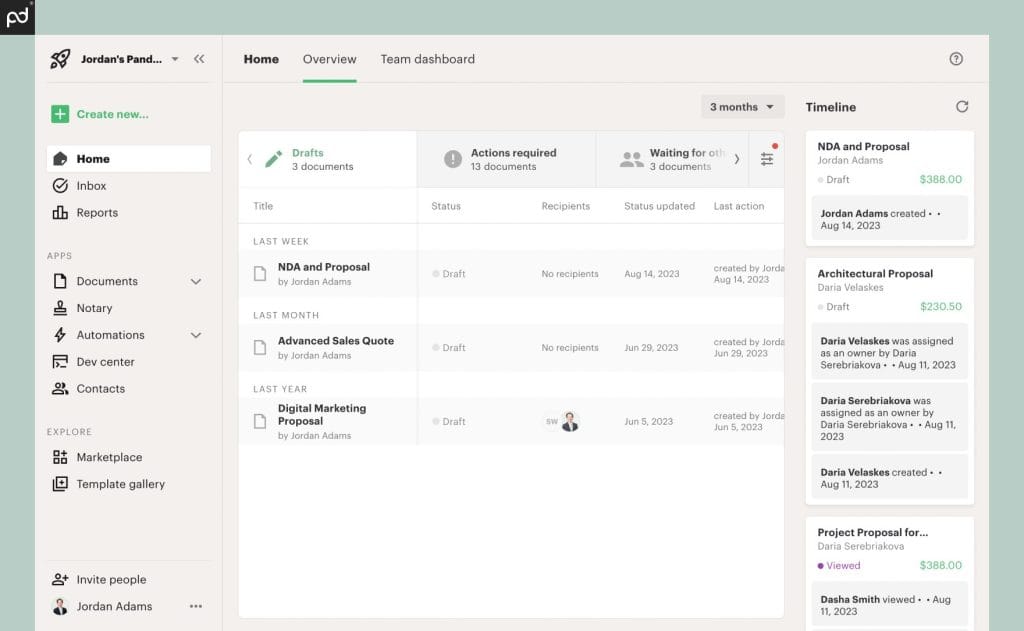
PandaDoc is a cloud-based document management platform that allows sales teams, agencies, and consultants to create, send, track, and collect electronic signatures on proposals, contracts, quotes, and other business documents. Founded in 2013, PandaDoc has grown into one of the most comprehensive proposal tools on the market, serving over 50,000 organizations globally.
At its core, PandaDoc combines a drag-and-drop document editor, a template library, CRM integrations, e-signature capability, payment collection, and analytics — all in one platform. It's particularly well-suited for teams already using HubSpot or Salesforce who want to automate the proposal-to-close workflow.
Best For (Use PandaDoc if...)
- Your team uses HubSpot, Salesforce, or Pipedrive as a CRM
- You send 20+ proposals/month and need to track them at scale
- You need manager approval workflows before sending proposals
- Your industry requires HIPAA or SOC 2 compliance
- You want to collect payments directly inside your proposals
- You manage a team of 5+ sales reps with different permissions
Not Ideal If...
- You're a solo consultant who sends 3–5 proposals/month
- You want the simplest possible setup with no learning curve
- Budget is your primary concern (Better Proposals = same price, lighter)
- You don't use a CRM (PandaDoc's biggest benefits require one)
- You primarily need fully web-native, interactive proposals (consider Qwilr)
PandaDoc Pricing (2026)
PandaDoc offers three main plans plus a free tier. All prices below are per user, per month, billed annually. Monthly billing is approximately 20% higher.
Free
Up to 5 documents/month
No credit card required
- ✔ Drag-and-drop editor
- ✔ eSignature (3 per document)
- ✔ 5 documents/month limit
- ✔ PDF export
- ✗ CRM integrations
- ✗ Analytics
- ✗ Custom branding
Verified March 25, 2026
Starter
For small teams
Billed annually · ~$29/mo billed monthly
- ✔ Unlimited document sends
- ✔ eSignature (all plans)
- ✔ Custom branding & domains
- ✔ Analytics & notifications
- ✔ CRM integrations (basic)
- ✔ 5 sends/month limit removed
- ✗ Approval workflows
- ✗ Salesforce integration
Verified March 25, 2026
Business
For growing teams
Billed annually · ~$65/mo billed monthly
- ✔ Everything in Starter
- ✔ Approval workflows
- ✔ Salesforce integration
- ✔ CRM automation
- ✔ Custom fields & variables
- ✔ API access
- ✔ SSO (Single Sign-On)
- ✔ Bulk sending
Verified March 25, 2026
Is PandaDoc worth the price?
For agencies sending 20+ proposals/month, the ROI is clear. PandaDoc's own case study data shows a 92% reduction in proposal creation time and 25% more documents sent per month after adoption. At $19/user/month, that's a low cost for a serious time-saving tool. The Business plan at $49/user is harder to justify for small teams, but essential for those needing Salesforce and approval workflows.
PandaDoc Features: What You Actually Get
Document Editor & Templates
PandaDoc's drag-and-drop editor is powerful and flexible. You can build proposals from scratch or start from one of their 750+ pre-built templates. The editor supports text blocks, image uploads, embedded video (YouTube, Vimeo, Vidyard, Wistia), tables, pricing tables, and signature fields.
One standout feature is Content Library — a shared repository of approved sections, images, and copy that reps can pull into documents. This enforces brand consistency without locking down every field.
eSignature
PandaDoc's eSignature is included on all paid plans and is legally binding under UETA, E-SIGN, eIDAS, and 21 CFR Part 11. You can set signing order, verify signer identity, define signing groups, and even notarize documents. The audit trail records every action with timestamps and IP addresses.
This level of compliance is overkill for most small agencies, but invaluable for healthcare, finance, and enterprise clients who require it.
CRM Integrations
This is PandaDoc's biggest competitive advantage. The integrations aren't just "export to PDF and attach" — they're deep, bidirectional connections:
- HubSpot: Create proposals from deal records. Sync proposal status back to HubSpot. Auto-fill contact and deal data. The HubSpot integration is consistently rated as PandaDoc's best feature by agency users.
- Salesforce: Business plan and above. Full managed package with native Salesforce app, SSO support, and deal-to-document automation.
- Pipedrive, Zoho, Copper, Close: Available on Starter and above.
- Zapier: Connect to 5,000+ apps for custom automation workflows.
Analytics & Tracking
PandaDoc shows you when a client opened your proposal, which pages they spent time on, and whether they've forwarded it. You get email notifications at each action and a full document timeline. For agencies trying to follow up at the right moment, this is invaluable.
Payments
PandaDoc supports payment collection via Stripe and PayPal, embedded directly into proposals. Clients can pay the full amount or a deposit at signing. This collapses the gap between "proposal accepted" and "first payment received" — a significant workflow improvement for agencies and consultants.
Security & Compliance
PandaDoc is:
- SOC 2 Type II certified
- HIPAA compliant (for healthcare clients)
- GDPR compliant (for EU data processing)
- E-SIGN and UETA compliant (for US-law electronic signatures)
- eIDAS compliant (for EU electronic signatures)
- 256-bit SSL encryption in transit and at rest
If you work with regulated industries, PandaDoc is one of very few proposal tools that meets these requirements.
PandaDoc Pros & Cons
Pros
- ✔ Best-in-class HubSpot & Salesforce integration
- ✔ Comprehensive compliance (HIPAA, SOC 2, UETA)
- ✔ 750+ professional templates
- ✔ Approval workflows for team oversight
- ✔ Embedded payments (Stripe, PayPal)
- ✔ Real-time document tracking & analytics
- ✔ Content Library for brand consistency
- ✔ 14-day free trial (no credit card)
- ✔ Strong mobile experience
- ✔ Bulk sending for high-volume teams
Cons
- ✗ Steeper learning curve than simpler tools
- ✗ Document overage fees on Starter plan ($3/doc)
- ✗ Salesforce integration requires Business plan ($49/mo)
- ✗ Can be overkill for solo users or very small teams
- ✗ Editor can feel rigid for highly custom layouts
- ✗ API access only on Business and above
- ✗ Less visually striking than Qwilr's web-native format
Ease of Use & Setup Experience
PandaDoc is not the simplest proposal tool to learn. Out of the box, there's a noticeable onboarding investment — especially if you're connecting it to your CRM. Expect 2–5 hours of initial setup for a typical agency workflow (templates, brand, CRM mapping, approval rules).
That said, once the system is configured, the day-to-day experience for reps is fast. Pulling a contact from HubSpot and generating a branded proposal with pre-filled fields takes under 5 minutes once templates are set up.
The mobile app is solid — you can send documents, check status, and collect signatures from any device.
Customer Support
PandaDoc offers email, chat, and phone support. Response times are generally fast for paid plans. Higher tiers include a dedicated Customer Success Manager who handles onboarding and periodic check-ins.
The help center and documentation are extensive. There's also an active community forum and a library of video walkthroughs for every major feature.
One caveat: some users on lower-tier plans report slower support response times. If immediate human support is a priority, note that Better Proposals offers 24/7 human support with no bots on all plans.
PandaDoc Alternatives to Consider
PandaDoc is the right choice for many agencies — but not everyone. Here are the best alternatives depending on your situation:
Better Proposals
Better if: you want simpler setup, lighter learning curve, and 24/7 human support. Same starting price ($19/user/mo). Great for teams under 10.
Final Verdict: Is PandaDoc Worth It?
Yes — for the right team. If you're an agency or sales team already using HubSpot or Salesforce, PandaDoc delivers the most seamless proposal-to-close workflow available. Its compliance, security, and enterprise features also make it one of the few tools that can handle regulated industries without custom workarounds.
If you're a solo consultant or a team of fewer than 5, the full power of PandaDoc might be more than you need. In that case, Better Proposals offers an equally capable core experience with a friendlier setup and the same starting price.
Our recommendation: Start with PandaDoc's 14-day free trial. If CRM sync and approval workflows feel transformative — stick with it. If the complexity feels like overhead, switch to Better Proposals or Proposify.
14-day free trial · No credit card required · Cancel anytime