Bonsai is the best all-in-one platform for solo freelancers and independent consultants who want proposals, contracts, invoices, time tracking, and project management in a single tool at a single low price. At $17/month (Starter), it's the most cost-effective way to professionalize every stage of your client workflow.
The trade-off is depth: Bonsai's proposal builder is competent but not visually sophisticated compared to dedicated tools like Better Proposals or Qwilr. If winning high-ticket work requires an impressive-looking proposal, you'll notice the difference. But if operational simplicity and eliminating subscription sprawl matter more to you — Bonsai is unbeatable at its price point.
Best for: Solo freelancers and independent consultants who want one tool for their entire business. Not ideal for: Agencies needing team features, or consultants who want best-in-class proposal design.
Pros
- Proposals + contracts + invoices + time tracking in one $17/mo tool
- Eliminates the need for 3–5 separate subscriptions
- Excellent contract templates (NDA, freelance contract, SOW, retainer)
- Automated payment reminders — reduces chasing clients
- Integrated time tracker that auto-generates invoices from logged hours
- Client portal — clients view proposals, invoices, and project files in one place
- Expense tracking and tax withholding estimation
- eSignature on all plans
- Stripe, PayPal, and ACH payment collection
- 7-day free trial (no credit card required)
- Very intuitive interface — setup in under an hour
Cons
- Proposal templates not as visually impressive as Better Proposals or Qwilr
- No deep CRM integration (no HubSpot, Salesforce, Pipedrive)
- Limited proposal analytics (basic view notifications only)
- No team features — built for solo or 2-person max
- Limited template customization flexibility
- Not suitable for agencies needing approval workflows
- Bonsai's "Starter" plan limits some automation features
- Primarily US-focused — some features not available internationally
What Is Bonsai?
Bonsai (marketed as Hello Bonsai) is an all-in-one business management platform built specifically for freelancers and independent professionals. Founded in 2016, it grew rapidly by solving a real pain point: freelancers were using 5–8 different tools for proposals, contracts, invoices, time tracking, project management, and accounting — paying $20–50/month for each.
Bonsai consolidates all of that into one platform at ~$17–32/month, with a UI that's clean, non-intimidating, and genuinely easy to use. It's not trying to compete with PandaDoc's enterprise feature set or Proposify's analytics depth — it's positioned as the single operating platform for your solo business.
Bonsai is used by over 500,000 freelancers globally, with the strongest adoption among designers, copywriters, developers, photographers, marketers, and independent consultants who work with multiple clients simultaneously.
Bonsai Pricing (2026)
| Plan | Price (Annual) | Price (Monthly) | Key Features |
|---|---|---|---|
| Starter | $17/mo | $24/mo | Proposals, contracts, invoices, time tracking, client portal |
| Professional Most Popular | $32/mo | $39/mo | Everything + subcontractor management, expense tracking, scheduler, intake forms |
| Business | $52/mo | $79/mo | Everything + accounting, 2 seats, talent pool, subcontractor 1099s |
Bonsai vs Competitors: Value Comparison
The key thing to understand about Bonsai pricing is that it replaces multiple tools. Here's what a freelancer typically pays without Bonsai:
Contract tool (DocuSign/eSign): $10–25/mo
Invoice tool (FreshBooks/Wave): $0–19/mo
Time tracker (Toggl/Harvest): $0–14/mo
Project management (Asana/Trello): $0–13/mo
Total: $29–$90/month across multiple tabs and logins
Bonsai Starter: $17/month. Everything in one place.
For a solo freelancer, the consolidation value is genuinely compelling. The Bonsai Professional plan at $32/month adds expense tracking, scheduling, and more automation — which is still cheaper than running a fragmented stack.
Bonsai Key Features
Proposal Builder
Bonsai's proposal builder lets you create professional project proposals using a template library. Templates cover freelance design, web development, copywriting, photography, consulting, and more. Key capabilities include:
- Section-based editor (scope, deliverables, timeline, pricing, terms)
- Custom branding with logo and color scheme
- Stripe, PayPal, and ACH payment collection at signing
- Optional deposit payment with signing
- View notifications when clients open proposals
- Convert accepted proposals directly to contracts and invoices
Honest assessment: Bonsai proposals are clean and professional but won't win design competitions. If visual design quality is your primary criterion, Better Proposals ($19/mo) or Qwilr ($35/mo) produce more impressive client-facing output. But if you want proposals that convert acceptances into contracts and invoices in one click — Bonsai's workflow integration is unmatched.
Contract Templates
This is one of Bonsai's strongest features. The contract library includes attorney-reviewed templates for:
- Freelance service agreement
- Non-disclosure agreement (NDA)
- Statement of Work (SOW)
- Retainer agreement
- Independent contractor agreement
- Photography contract, web design contract, consulting contract
Each template is customizable, and clients sign via eSignature directly from a browser link (no download required). Bonsai tracks when contracts are opened, signed, and stores them permanently. For freelancers who previously used Google Docs for contracts or paid separately for DocuSign, this is a major workflow upgrade included at no extra cost.
Invoicing & Payments
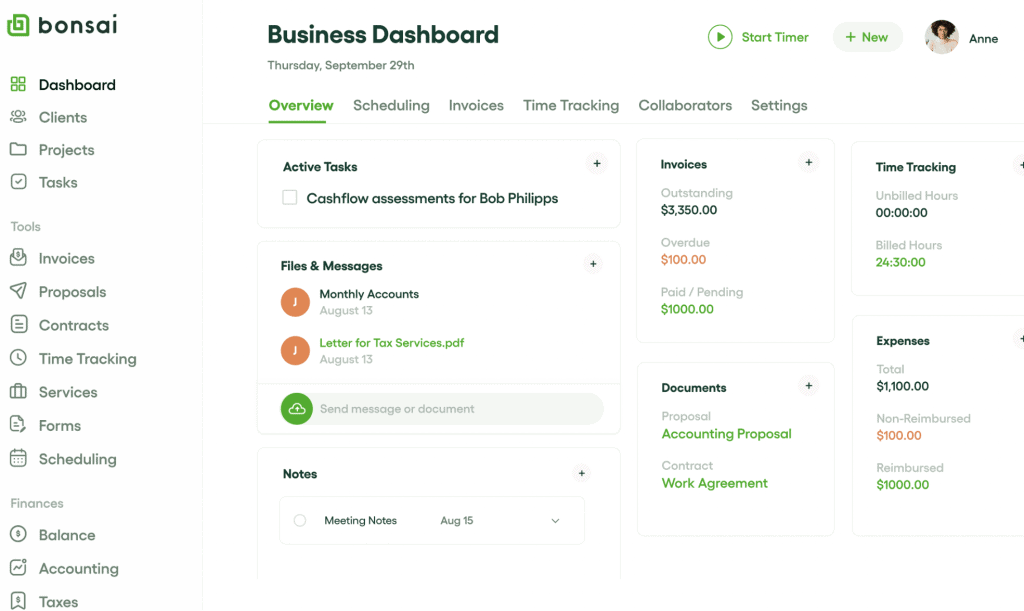
Bonsai's invoicing module is comprehensive for a solo business:
- Create one-time or recurring invoices
- Connect time tracking — log hours, then generate an invoice from hours automatically
- Automated payment reminders (customizable frequency and tone)
- Partial payment and deposit workflows
- Accept Stripe, PayPal, ACH bank transfer, and credit cards
- Late fees (configurable)
- Invoice history and client payment tracking
The automated payment reminders alone have been credited by thousands of Bonsai users with significantly reducing late payments — a common pain point for freelancers who dislike chasing clients.
Time Tracking
Bonsai includes a built-in time tracker that connects directly to your projects and invoices. Start/stop a timer against a client project, log hours, and then create an invoice from those logged hours with one click. This eliminates the friction of manually calculating billable hours and is a meaningful time saver for consultants billing hourly.
Client Portal
Each client gets a dedicated portal where they can view and sign proposals, access signed contracts, see all invoices and payment history, and communicate with you on project tasks. This professionalized experience — where clients have one organized place for everything — is a significant differentiator for Bonsai versus using a collection of separate email attachments and tools.
Project Management
Bonsai includes basic project management: task lists, project milestones, client communication threads, and file sharing. It's not a full Asana replacement — no Gantt charts or advanced dependencies — but it handles the needs of most solo consultants managing 3–8 client projects simultaneously.
Who Is Bonsai Best For?
Bonsai is ideal if you...
- Are a solo freelancer or independent consultant (1–2 people)
- Currently use 3+ separate tools and want to consolidate
- Need proposals, contracts, AND invoices in one workflow
- Bill hourly and want time-tracking to invoice integration
- Hate chasing clients for payment (automated reminders)
- Want a client portal that looks professional
- Budget is a priority — $17/month covers your whole business
- Work as a designer, developer, copywriter, photographer, or generalist consultant
Bonsai is not ideal if you...
- Have a team of 3+ people (Bonsai is built for solo/duo)
- Sell high-ticket work where proposal visual quality is a differentiator
- Use HubSpot or Salesforce CRM (no integration)
- Need deep proposal analytics to optimize close rates
- Need manager approval workflows before proposals go out
- Are primarily focused on proposal quality over operational consolidation
Bonsai vs Competitors: Quick Comparison
| Factor | Bonsai | PandaDoc | Better Proposals |
|---|---|---|---|
| Starting price | $17/mo (solo) | Free → $19/user/mo | $19/user/mo |
| Proposals | ✔ Good | ✔ Excellent | ✔ Best-in-class design |
| Contracts / NDAs | ✔ Full library | ✔ Full workflow | ◑ In-proposal only |
| Invoicing | ✔ Full invoicing | ◑ Via integrations | ✗ |
| Time tracking | ✔ | ✗ | ✗ |
| CRM integration | ✗ None | ✔ HubSpot, Salesforce | ✔ HubSpot, Pipedrive |
| Team features | ✗ Solo/duo only | ✔ Enterprise-grade | ✔ Up to unlimited |
| Proposal analytics | Basic opens only | Section-level analytics | Opens, time spent |
Final Verdict: Is Bonsai Worth It?
Yes — for solo freelancers and independent consultants, Bonsai is one of the best value decisions you can make. Replacing multiple subscriptions with one $17/month tool that handles your entire client workflow is a genuine operational upgrade, not just a cost saving.
The honest caveat: if proposal design quality is the main driver of your evaluation, you'll get better-looking output from Better Proposals or Qwilr. Bonsai's proposals are professional but not visually distinctive. For consultants pitching $50K+ engagements where design impressions matter, consider pairing Bonsai's contracts/invoices with a dedicated proposal tool — or simply switch to Bonsai if operational consolidation is the higher priority.
Recommended for: solo freelancers and independent consultants who want proposals + contracts + invoices + time tracking in one platform at the lowest available price.
Not recommended for: agencies needing team features, CRM-heavy workflows, or consultants who need best-in-class proposal design.
No credit card required · From $17/month after trial
Bonsai FAQ
Bonsai's proposals are competent and professional, but they're not the best in the market for visual quality. If proposal design is your #1 criterion, Better Proposals or Qwilr produce more impressive output. Bonsai's real strength is the integrated workflow — a signed proposal can instantly convert to a contract and then to invoices, saving hours of manual work.
Yes. Bonsai works well for independent consultants — strategy consultants, business consultants, marketing consultants, and similar solo professionals. Its contract templates include SOWs and consulting agreements, and its invoicing supports both hourly and project-based billing models. The main limitation is team size — it's built for solo or 2-person operations. See our Best Proposal Software for Consultants guide for a full side-by-side comparison.
Bonsai costs $17/month (Starter), $32/month (Professional), or $52/month (Business) on annual billing. Monthly billing is ~30–50% higher. There is no permanent free plan — only a 7-day free trial. The Starter plan at $17/month covers proposals, contracts, invoices, and time tracking for one user.
No. Bonsai does not have native CRM integrations with HubSpot, Salesforce, or Pipedrive. If you use a CRM and need deep integration, PandaDoc is the better choice. Bonsai is designed as a standalone client management system, not an extension of a CRM workflow.
They serve different needs. Bonsai wins for all-in-one solo business management: proposals + contracts + invoices + time tracking at $17/month. PandaDoc wins for proposal and document quality, CRM integration, and analytics — but requires separate tools for invoicing and time tracking. If you want one tool for everything at the lowest price, Bonsai wins. If you want the best proposals with CRM integration and a free plan to start, PandaDoc wins.